

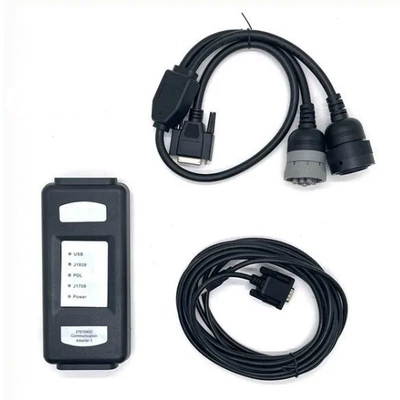
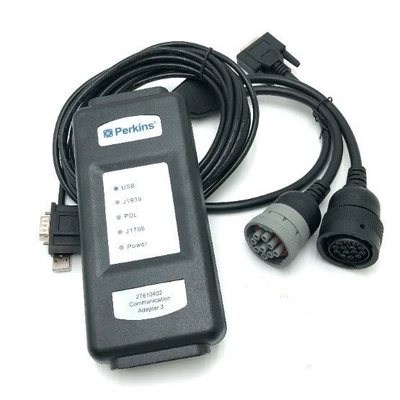
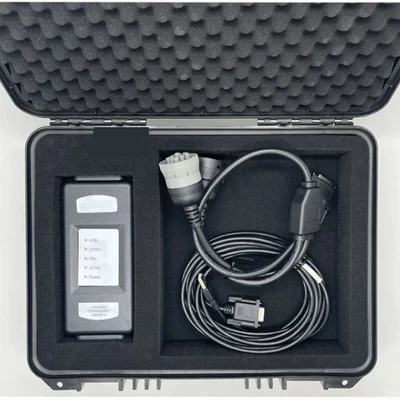
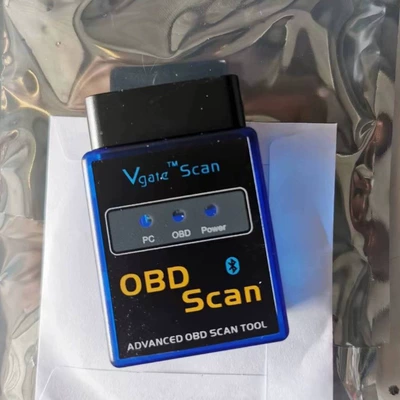


| İdxal olunub: Bəli/Xeyr | No |
| Emal və fərdiləşdirmə | Bəli |
| Növ | Avtomobil nasazlıq diaqnostika aləti |
| Enerji təchizatı gərginliyi | 12–24 |
| İşləmə temperaturu | 56 |
| Brend | AERMOTOR |
| Model | Cat et4 |
| Əsas aşağı axın platformaları | Ebay |
| Əsas aşağı axın platformaları | Amazon |
| Əsas aşağı axın platformaları | Wish |
| Əsas aşağı axın platformaları | AliExpress |
| Əsas aşağı axın platformaları | Müstəqil mağaza |
| Əsas aşağı axın platformaları | Lazada |
| Əsas aşağı axın platformaları | Digər |
| Əsas satış sahəsi | Afrika |
| Əsas satış sahəsi | Avropa |
| Əsas satış sahəsi | Cənubi Amerika |
| Əsas satış sahəsi | Cənub-Şərqi Asiya |
| Əsas satış sahəsi | Şimali Amerika |
| Əsas satış sahəsi | Şimal-Şərqi Asiya |
| Əsas satış sahəsi | Yaxın Şərq |
| Əsas satış sahəsi | Digər |
| Sərhədlərarası ixrac üçün xüsusi təchizat mənbəyidirmi? | Bəli |
| Spesifikasiyalar | Perkins tester plastik qutu modeli |
| Spesifikasiyalar | Perkins tester kağız qutu modeli |
卡特三代诊断工具 ET4,挖掘机检测仪,大量现货,有纸盒装和胶箱装可选。配2019A,设备支持更新的软件版本,但需自备最新的软件。
CAT3 Caterpillar ET3 Wireless Diagnostic Tool
This is the only recommended communication device for CAT, and the only datalink device that will allow you to properly communicate with a CAT engine on dual datalinks.
Software version: 2019A/2025A(Buy)
Catepillar ET4 Adapter III Communication:
1. Allows communication between service tools and engine controls using various data links such as J1939/11, DeviceNet (future release), CAT DataLink, and J1708 (ATA) vehicle networks;
2. Flash program allows adapter firmware upgrades as additional features become available;
3. Uses J1939/11, high-speed data link (part of ADEM III controls), substantially reducing flash times;
4. Automatically selects J1939/11 when flashing the engine (reduces the flash time approximately 80%, from 14 minutes to 3 minutes).
2. View ECM’s current configuration and change user settings
3. Perform diagnostic tests and calibrations, and calibrate
4. Electro-mechanical and electro-hydraulic components
5. Context sensitive help leads operator through every task Cat ET can perform
6. Data Logger and Data Log Viewer allows recording of ECM signals for delayed troubleshooting capability.
Over speeds, high temperatures, fuel consumption, transmission shift counts. This can provide awareness to change operator
Specification:
3. Fast hookup and real time display of systems status. Displays ,readings such as rpm, boost, pressures, temperatures, etc. for Easy troubleshooting.
4. Identifies faulty sensors, harness connectors, and system parameters which are out of specification. Allows customers
5. To help dealer identify problems without visiting machine.
6. Identifies intermittent sensors and wiring problems during Machine operation and keeps a record of each one. Showswhen problem occurred and how often it happened.
7. Added information to allow customer to assist dealer in diagnosing and repairing problems. (Troubeshooting Help is not built in with in the program, you will still need go back to books in order to follow a repair description and steps in each Fault Code display within the program).English and metric units of measure integrated help file to easy learn the "How To" around the software.
PC, Communication Hardware, and Cable Requirements
To run the service tool, the next PC, communication hardware, and cable requirements must be met. NOTE: The minimum PC Configurations should not be used as a standard when buying new personal computers for service tool purposes. If the existing equipment meets these minimum requirements, it will run the service tool.
PC Requirements
Recommended Configurations
PC containing a 2.0 GHz dual-core processor
3GB RAM
3GB of the available hard disk drive
DVD-ROM drive (optionally)
15.4-inch XGA Screen (1280x1024 compatible)
Microsoft Windows™ 7 Professional or Windows 8 Professional, Windows 10 Professional (Not tested with Home Edition) (Note: Windows 8 RT is not supported)
RS232 port with 16550AF UART or compatible (for use with Comm Adapter II)
USB 1.1 or 2.0 port (for use with Comm Adapter 3)
Ethernet RJ45 connector
Built-in pointing device or mouse
For security purposes, Microsoft Internet Explorer version 11 or newer or Microsoft Edge is recommended.
Note: The most recent version of Microsoft Internet Explorer may not be validated to work with the service tool.
Wi-Fi (for the Wireless Comm Adapter 3)
Minimum Configurations
PC containing a Pentium 2 GHz processor or greater
1GB RAM
500MB of an available hard disk drive
CD-ROM drive
Super VGA monitor or display (1024x768)
Microsoft Windows™ 7 Professional or Windows 8 Professional, Windows 10 Professional (Not tested with Home Edition) (Note: Windows 8 RT is not supported)
RS232 port with 16550AF UART or compatible (for use with Comm Adapter II)
USB 1.1 or 2.0 port (for use with Comm Adapter 3)
Ethernet RJ45 connector
Built-in pointing device or mouse
For security purposes, Microsoft Internet Explorer version 9 or newer is recommended. Note: The most recent version of Microsoft Internet Explorer may not be validated to work with the service tool.
Communication Hardware
Caterpillar Communication Adapter IV
Configuring Cat Electronic Technician to use the Communication Adapter 3
For Cat Electronic Technician to work with the Communication Adapter 3, the settings must be changed to select the Communication Adapter 3 as the Communication Interface Device:
Step 1 Start Cat Electronic Technician.
Step 2 Click the Stop Connect button when it appears.
Step 3 Select the Utilities menu.
Step 4 Choose “Preferences > Modify...”.
Step 5 Select the Communications tab.
Step 6 Select Cat Comm Adapter 3 (RP1210) and click OK.
NOTE: Because a growing number of products require multiple data link service, the “Enable Dual Datalink Service” checkbox has been pre-selected.
Servicing ECMs on more than one data link requires this check box to be enabled.
Failure to do this will result in undetected ECMs and reduced functionality.
Package list:
1pc x CAT ET4 Diagnostic Interface
1pc x 2019A Software CD
1pc x USB Cable
1pc x J1939/J1708 Cable
1pc x 9+14pin Cable
1pc x Plastic box


